
ChatGPT can be helpful for many SEO-related functions, including but not limited to local SEO, keyword research and SEO-focused content creation.
Title tags are another area the platform can help you with. Even if Google doesn’t always use them, title tags are still a critical on-page SEO element.
Even Google’s John Mueller acknowledged that ChatGPT could be helpful for creating page titles.
This article examines how ChatGPT and the ChatGPT API can help you create compelling, clickable title tags.
Before we dive in, keep the following caveats in mind:
- The quality of your prompts will largely determine the quality of your responses.
- ChatGPT is not an SEO tool, so it’s not explicitly designed to create SEO-friendly title tags.
- You must always review and QA the tool’s output (it can often be wrong!).
- The platform has a rough sense of text output and characters but doesn’t necessarily observe them precisely – an important point for title tag creation or editing.
- ChatGPT will only “remember” around 3,000 words of your chat.
- The ChatGPT API won’t remember anything else but the prompt you’re applying at that moment and often ignores system messages.
- You cannot fine-tune the ChatGPT API, but you can fine-tune the OpenAI API (which is more expensive than the ChatGPT API).
For this article, I’ll focus on tasks you can do using either the ChatGPT web interface or the API. But you can extrapolate some of these and imagine how they may work with the Da-Vinci API or future versions of the ChatGPT API.
Let’s start by having the tool help me rewrite a title tag using some best practices.
If you have your own process, you can implement that. In this case, I will try to get ChatGPT to rewrite my title tags “like a pro.”
First, I’m going to take an article by Ross Hudgens at Siege Media about SEO title tag best practices and have ChatGPT analyze it:

Next, I looked at the search results for “best beach wedding dresses” and grabbed a listing by David’s Bridal (just because it was ranking in the middle of the first page) and asked ChatGPT to rewrite their title tag:

And here is what ChatGPT came up with after sharing the article and the title tag:

Pretty interesting!
Let’s try the same thing, but this time with a different title tag process from Mike at Niche Twins:
Same approach here, I created a new chat (again: ChatGPT’s short memory!) and pasted in the contents of the thread and then asked ChatGPT to generate a new title tag based on Mike’s process:
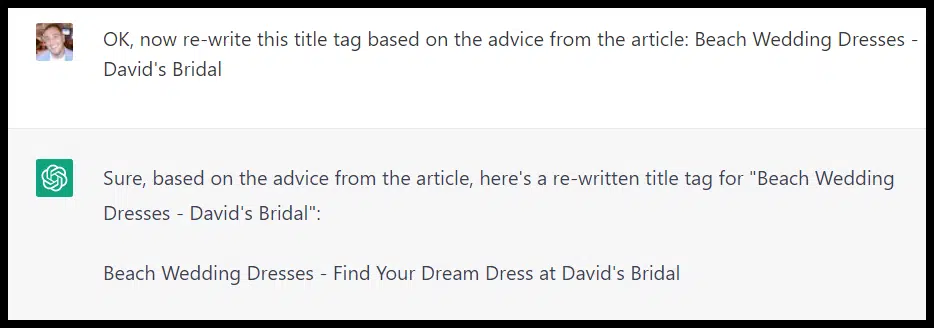
ChatGPT does seem to have used a formula more in-line with the source, but it used a variation of “dream dress” again.
I’d opened a new chat for this prompt, so ChatGPT shouldn’t have used my previous prompt or result as context.
I asked it why it chose that